09/24/2026
Enterprise Platforms Without the Guided Tour
Part of No Login Required, a series about running a business by talking to your systems instead of clicking through them. The series opener on belchamber.us sets out the idea; this piece tests it on the hardest ground available.

A common reaction when I describe managing software by conversation goes like this: "Sure, for a blog. My systems are more complicated than that."
It's a fair objection, so here is the stress test. Alongside my own businesses, I do enterprise work on some of the most menu-heavy platforms on the market. These systems ship with training courses, certification tracks and, yes, guided tours. Like most guided tours, those end in the gift shop, which in software is the upgrade page.
If talking to your systems works there, the question for a small business isn't whether it works on simpler tools. It's which of your tools are ready for it.
The enterprise console problem, in one platform
Salesforce Marketing Cloud is the clearest example I know. It's powerful, and it's layered. Data extensions hold the audience data, journeys decide who gets what and when, and automations in Automation Studio move data around on a schedule. Each lives in its own part of the interface, with its own screens and vocabulary.
One change, three places to visit
- The audience data
- Lives in data extensions.
- Who gets what, and when
- Lives in journeys.
- Moving data on a schedule
- Lives in automations, in Automation Studio.
A single change can mean visiting all three. By conversation, the assistant knows where each piece lives, so I don't have to navigate to it.
Working through an AI assistant, I manage everything from data extensions to journeys and automations by describing what I need. The platform didn't get simpler. My route through it did.
Platform by platform
Content management: Sitecore, Drupal and WordPress
Posting and editing content, adding and removing users, in Sitecore, Drupal or WordPress. These are the chores every content system shares, and in the enterprise versions they sit behind the most elaborate editing screens. By conversation, "update this page" and "remove this user" are just requests.
Observability: New Relic and Dynatrace
New Relic and Dynatrace both offer synthetic monitoring: scripted checks that act like a visitor and raise an alarm when something breaks.
Setting them up by conversation came with a benefit I didn't expect. The cryptic terms and threshold conditions get simplified. I describe what "broken" means in plain English, and the assistant translates it into each vendor's dialect.
Ticketing: Jira and ServiceNow
In Jira and ServiceNow, I can read, summarize, update and edit any ticket without opening the ticket form. Anyone who has worked in either knows those forms are busy. Asking "what's the state of this request, in three lines?" is a different experience from scrolling a long history of comments and field changes.
Infrastructure: Terraform
Terraform describes cloud infrastructure as code. Asking the assistant for the current state of the infrastructure, then making the update through it, is much cleaner and faster. It also keeps environments in step, in parallel.
The setup used YAML files as an abstracted configuration layer for scripts that ran Terraform dynamically, plus the pipeline configuration, one set per environment. Instead of hand-updating five of those and hoping they still match, the change is described once and made everywhere.
The same list goes on: Google Cloud, Google Analytics, Google Tag Manager, privacy platforms like Ketch, and ad servers from open-source ones like Revive Adserver to Kevel. The interfaces differ; the pattern doesn't.
What stayed manual, and why
This approach has limits, and they're consistent enough to plan around. The clearest record I have is from my own businesses:
- Granting access is done inside the product. Connecting my Search Console data took about two minutes of my time: adding a service account (a login that belongs to software, not a person) as a user in Search Console itself. Google Analytics needs the same kind of grant inside Analytics, and as of late September 2026, that one is still on my to-do list.
- Some setup screens have no other door. When I moved my Google Cloud admin off the Cloud Console in August, the sign-in consent screen stayed a by-hand job. It has no command-line equivalent.
- Some limits are deliberate. The key my assistant uses for DNS at my web host can list and add records but not delete them. Removing a stale record is still a quick edit in the host's panel, and that's by design: the less a key can do, the less can go wrong.
- Approval stays with a person. On my own sites, nothing new that AI wrote goes live until I've said yes.
- The code gets reviewed. The connections between an assistant and these platforms are software, often written with AI help. Review it as thoroughly as your goals and time allow; automated checks are welcome, in addition to that review rather than instead of it.
None of this is a failure of the approach. It's where the human belongs: deciding who gets access, what they're allowed to do, and what goes public.
What carries over to a small business
Here's the encouraging part. Every enterprise example above works for one reason, and it isn't the size of the platform. It works because the platform can be reached without its screens, through an API (a documented way for software to talk to software) or a command-line tool.
Small-business software often has the same doors. WordPress, Google Analytics, Tag Manager, Google Cloud and many web hosts all offer them. In my own businesses I've already moved Google Cloud admin, Search Console reporting and DNS changes out of the consoles and into conversation.
The companion piece on the login tax walks through those before-and-after cases. It also gives you a one-hour audit to price what the consoles are costing you now.
Three things carry over directly
Plain-language translation
The observability benefit, turning vendor jargon into plain English, is just as useful on a small tool you open twice a year.
Summaries instead of screens
If a ticket summary saves time in ServiceNow, a summary of your inbox-driven support queue or your project board saves time too.
One conversation across many tools
The biggest win isn't any single platform. It's not having to remember twelve different interfaces.
If you're weighing a project board, see whether Jira suits a small business.
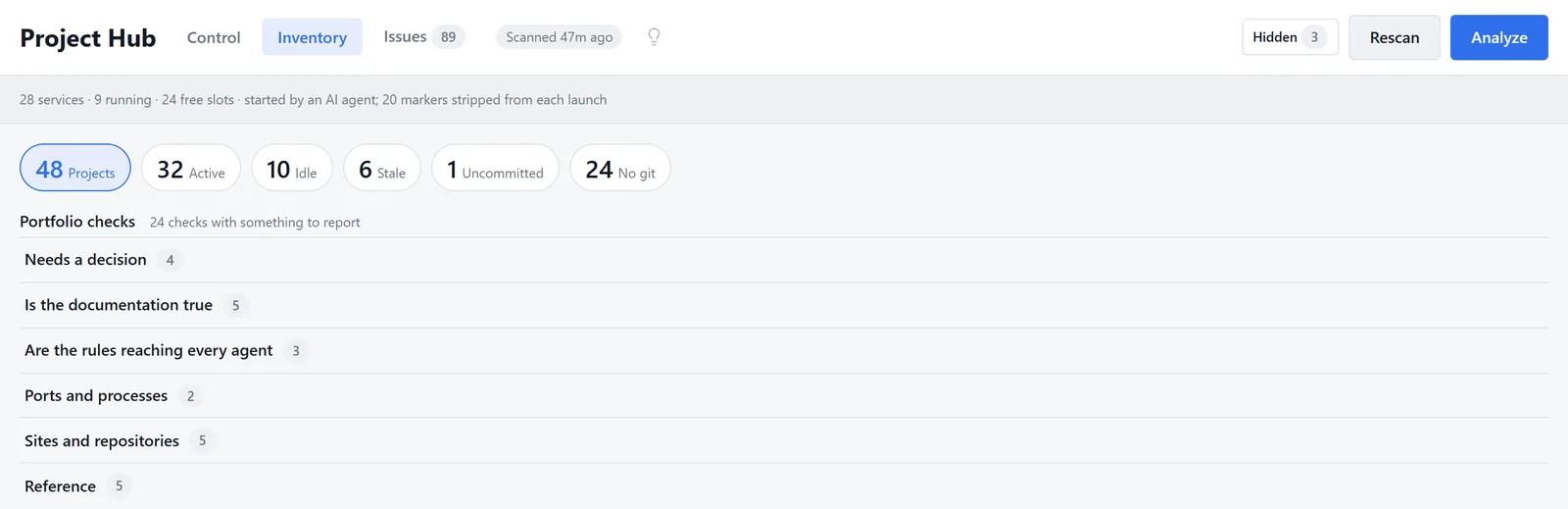
My own Project Hub: 48 projects counted as active, idle, stale or uncommitted, with portfolio checks such as "Needs a decision" listed on the same screen.
The takeaway for choosing tools
If you take one thing into your next software decision, make it this: ask whether the tool can be reached without its interface. Feature lists age quickly. A vendor without an API is a vendor you'll be logging in to for as long as you keep it. I make that case in full in buy software that has an API.
That's also the kind of expensive-to-reverse decision a business growth consultant is for. The platforms will keep adding menus. You don't have to keep touring them.
More in No Login Required
- Will We Even Need Admin Panels?, the series opener, on belchamber.us
- The Login Tax: What Admin Screens Really Cost
- Buy Software That Has an API
Ready to find out what your own software stack is costing you?
A business growth and technology consultant looks at your actual systems, not a generic playbook, and tells you plainly what is worth fixing first.