Systems & tooling
Choosing the tool is the easy part. Choosing the category is not.
Most tool decisions that go wrong were the wrong question. Not "Asana or Jira" but "does this business need project management software at all, or does it need someone to decide who owns what".
Integrated Data Flow Without SaaS Bloat
Adding more standalone tools creates data silos, manual double-entry, and monthly subscription sprawl.
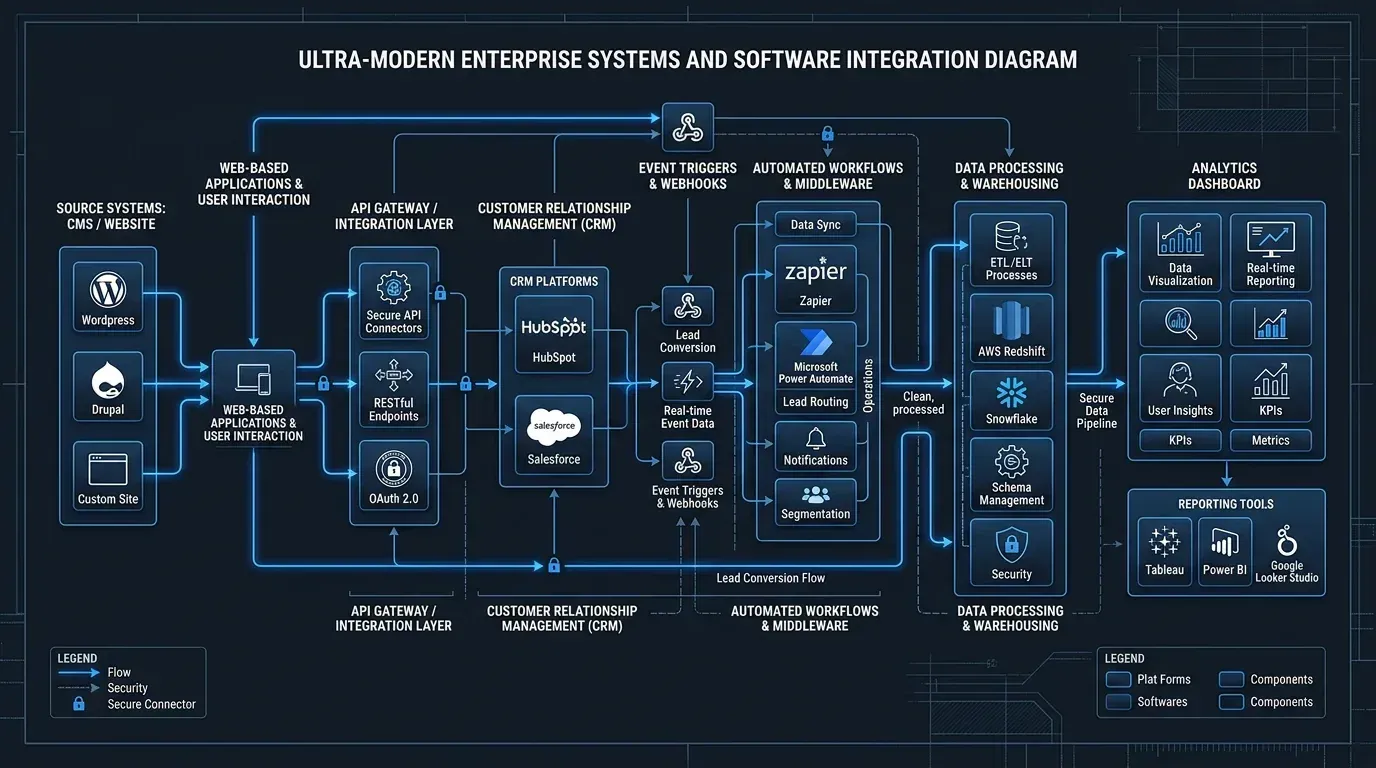
We design cohesive systems pipelines connecting your website, CRM, communication, and analytics—ensuring data flows cleanly without hiring a fleet of developers or paying for unused enterprise seats.
The mistake almost everyone makes first
A tool gets picked to fix a problem the tool cannot fix.
Work is slipping, so a project management system goes in. Follow-ups are being missed, so a CRM goes in. Six months later the same things are slipping, and now there is also a subscription and a half-populated system nobody trusts.
The common cause is that the original problem was about ownership and process, not about software. No tool decides who is responsible for a job, and no tool makes anyone update it.
That is the first thing worth an outside opinion: whether you have a tooling problem at all.
When it genuinely is a tooling problem
There are clear cases, and they are worth naming so the paragraph above is not mistaken for "never buy anything".
- The work exists in someone's head. If one person leaving would take the schedule with them, that is a systems problem.
- The same data is typed in more than once. Re-keying between a booking system, an invoice and a spreadsheet is a cost that grows with the business.
- Nobody can answer a simple question quickly. How many jobs are open, which customers have not bought since spring, what is late.
- The tool you have is built for a different size of company. This is the specific one people arrive with: heavyweight software adopted because it is what a larger organization used, and abandoned because the overhead of running it exceeded what it saved.
What choosing well actually involves
Start from what the team will realistically do, not from a feature comparison. The best tool that nobody updates loses to the mediocre one everybody does.
Decide the category before the product. Project management, CRM, shared inbox, scheduling and marketing automation overlap enough that businesses often buy two things that do the same job and use neither properly.
Count the real cost. The subscription is the visible part. Setup, migrating what you already have, training, and the ongoing job of keeping it accurate are usually larger, and are what determine whether it sticks.
Plan for leaving before arriving. Can you get your data out, in a form something else can read? A tool you cannot leave is a decision you only get to make once.
Pilot with real work. A fortnight of actual jobs in a free tier tells you more than a month of comparison articles — including this site's.
Where we come in, and where we do not
Brandager resells nothing and holds no partner or reseller agreements with any of these vendors. There is no shortlist that happens to match who pays us, and "keep what you have" is an available answer — it is frequently the right one.
What we will not do is run the rollout for you or make the decision on your behalf. The recommendation comes with its reasoning, the options rejected and why, and what it should cost. Owning it is yours.
The order these questions go in
- Is it a tooling problem at all?Or is it ownership and process wearing software's clothes?
- What will the team actually keep updated?The best tool nobody maintains loses to the mediocre one everybody does
- Which category?Project management, CRM, shared inbox and scheduling overlap more than they look
- What does it really cost?Setup, migration and training, not the subscription
- Can you leave?Export your data in a form something else reads — check before you commit
- Then pick the productAnd pilot it with real work for a fortnight
Most tool decisions that went wrong started at the last one. Working backwards from a product is how a business ends up owning two things that do the same job.
Common questions
Is Jira suitable for a small business?
Sometimes, and the answer depends on the team rather than the tool. Jira is built for software teams working in structured cycles, and it rewards a business that genuinely works that way with capability few alternatives match. A small business without that structure usually finds the configuration overhead exceeds what it saves, and would be better served by something simpler. The question worth asking first is whether the team already works in the way the tool assumes.
How do I choose a project management tool for a small business?
Decide the category before the product, start from what the team will realistically keep updated rather than from a feature comparison, count setup and migration and training rather than the subscription alone, and check you can export your data before you commit. Then pilot with real work for a fortnight — that reveals more than any comparison, because adoption is what decides these, not features.
Do I even need project management software?
Often not. Work slipping is usually a problem of ownership and process rather than of software, and no tool decides who is responsible for a job or makes anyone update it. The clear signs you do need one are work that only exists in someone's head, the same data being typed in twice, or nobody being able to say quickly what is open and what is late.
Do you resell or take commission on the tools you recommend?
No. Brandager holds no reseller or partner agreements with any of these vendors and takes no commission. That is what allows "keep what you have" and "you do not need this" to be real answers rather than ones that cost us money.
What does choosing badly actually cost?
Rarely the subscription. The costs that hurt are the migration you do twice, the months where a half-populated system is trusted by nobody, and the data you cannot get out when you want to leave. That last one is why an exit route is worth checking before signing up rather than afterwards.
The comparisons, if you would rather read first
Not sure whether you need a tool or a decision?
That is usually the real question. Describe what is going wrong and we will tell you which of the two it is — and whether it needs us at all.